What actually runs well on a 16 GB MacBook
Almost every LLM benchmark you read runs on a datacenter GPU. That tells you nothing about the machine actually on your desk. So I measured it: which models run well on a MacBook Air 15-inch (M3, 16 GB) — a mainstream, mid-range Mac — and where it falls over.
Short version: a 16 GB Mac is a genuinely useful local-LLM machine up to about 8B parameters. Past that, it hits a wall — and the wall isn’t subtle.
The numbers
4-bit models via MLX, 256 tokens generated, measured on the machine itself (MacBook Air 15″, M3, 16 GB, macOS 26.5):
| Model | Gen tokens/sec | Peak RAM |
|---|---|---|
| Llama-3.2-1B | 38.7 | 0.8 GB |
| Phi-3.5-mini (3.8B) | 10.6 | 2.5 GB |
| Qwen3-4B | 10.8 | 2.4 GB |
| Qwen3.5-4B | 9.8 | 2.6 GB |
| Falcon3-7B | 5.7 | 4.3 GB |
| Llama-3.1-8B | 5.1 | 4.7 GB |
| Qwen3.5-9B | did not finish | — |
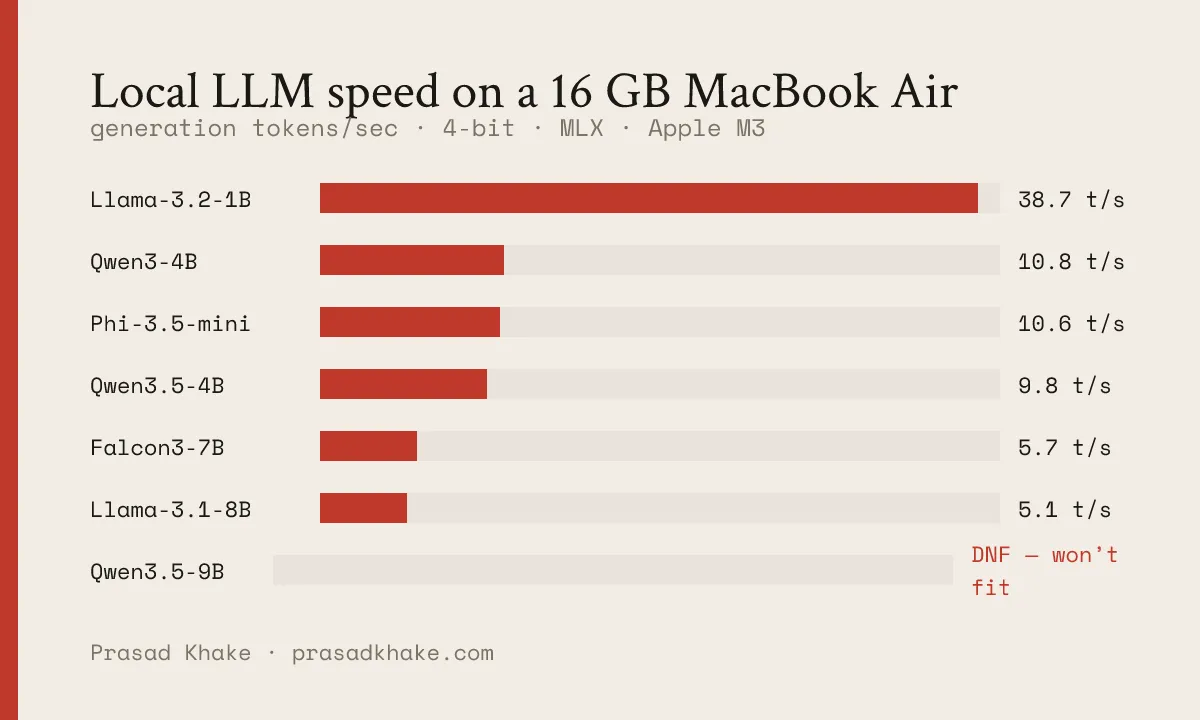
Generation speed by model — MacBook Air 15″ (M3, 16 GB). The 9B never finishes: it tips into swap and crawls.
The shape is clean:
- 1B flies (~40 tok/s) — faster than you can read, uses under a gigabyte.
- 4B-class is the sweet spot — ~10 tok/s, ~2.5 GB. Comfortably conversational, leaves plenty of room for your actual work.
- 7–8B is the practical edge — ~5 tok/s. Usable for non-interactive tasks (summaries, drafts), a little slow for live chat.
- 9B is over the line.
The 16 GB wall
The 9B didn’t just run slowly — it never finished a 256-token response in five minutes. Not because the model is huge (a 9B at 4-bit is only ~5–6 GB of weights), but because of what else is using your RAM.
On a 16 GB Mac doing real work, macOS takes ~4 GB, and an editor plus a browser easily take another 6–8 GB. That leaves ~4–6 GB for a model. An 8B (peak ~4.7 GB) just fits. A 9B needs a bit more than you have — so macOS starts paging the model’s weights to SSD, and generation slows to a crawl as it reads them back token by token.
I confirmed this wasn’t a fluke: the 9B failed to finish in two independent runs, including one that started with 67% of RAM free. It might fit on a freshly-rebooted machine with nothing else open — but nobody reboots their laptop to chat with a model. Under the conditions you’ll actually use it, 8B is the ceiling.
The deeper point: on 16 GB, peak RAM matters more than tokens/sec. The speed differences between a 4B and an 8B are tolerable; the difference between “fits” and “swaps” is the difference between usable and useless. (Model size isn’t the only thing that grows the bill — context does too: the same 8B that peaks at 4.7 GB here reaches 9.3 GB at a 32k-token context.)
Three things that almost gave me wrong numbers
Benchmarking on a laptop is easy to get wrong. Three traps I hit (all now handled in the tool):
- Cold-start. The very first generation in a process pays a one-time Metal kernel-compilation cost. My first 1B number came in at 33 tok/s; with a throwaway warmup generation first, it was 44. Always warm up before timing.
- The laptop sleeping mid-run. I time wall-clock, and at one point the Mac went to sleep between models — which showed up as a model taking 460 seconds to load. It was napping. Run benchmarks under
caffeinateso the machine can’t idle-sleep. - Memory accumulating across models. Running all models in one process, MLX didn’t fully release memory between them, so each later model looked slower than it was. The fix: run each model in its own subprocess, so the OS reclaims everything in between.
That last one is also why the tool gives each model a hard timeout — so one too-big model records a clean “did not finish” instead of hanging the whole run.
So what should you run on a 16 GB Mac?
- Want it snappy and out of the way? A 4B (Qwen3-4B — run it with thinking off, Phi-3.5). ~10 tok/s, 2.5 GB, barely touches your headroom.
- Want the most capable model that still fits? An 8B (Llama-3.1-8B). ~5 tok/s, and you’ll want to keep other apps light.
- Eyeing a 9B+? Either get 24 GB+, or accept that you’ll be closing everything else first.
The tool that produced these numbers is open source: ondevice-bench — point it at your own machine and models.
I’m Prasad Khake — I make LLMs run well on real, on-device hardware, and build the products around them. More measurements like this in On Device.