Gemma 4 12B on a 16 GB Mac: 11 GB RAM, 2.7 tok/s, and what my benchmark got wrong
Correction (2026-06-06). The first version of this post reported “100% quality / 21-21” for several models. Those scores were inflated by a bug in my benchmark’s answer-extraction. I found it re-running the suite, fixed it, re-measured every model on one uniform methodology, and rewrote the numbers below. The story actually got stronger — and the bug itself turned out to be the more interesting finding. Details at the end.
Google’s Gemma 4 12B uses 11.4 GB of RAM and generates at 2.7 tok/s on an M3 MacBook Air with 16 GB unified memory — 2.4× the memory footprint of Llama-3.1-8B at well under half the speed. Its math and factual answers are flawless. Its coding ability can’t be cleanly measured by an execute-the-code benchmark (more on why below — it’s not what you’d guess).
For text-only work on a 16 GB Mac, it’s not the upgrade it looks like. Here’s the full picture.
The numbers
Measured with mlx-community/gemma-4-12B-it-4bit on a MacBook Air 15-inch (M3, 16 GB, macOS 26.5): one uniform run per model, 2048-token budget, peak RAM via mx.get_peak_memory() reset per model, caffeinate to prevent sleep.
| Model | RAM | tok/s | Coding | Math | Factual |
|---|---|---|---|---|---|
| Qwen3-4B-4bit (thinking off) | 2.47 GB | 8.7 | 7/8 | 8/8 | 4/5 |
| Llama-3.1-8B-4bit | 4.71 GB | 6.6 | 7/8 | 5/8 | 5/5 |
| Gemma-3-12B-QAT-3bit | 6.09 GB | 3.9 | 6/8 | 7/8 | 4/5 |
| Gemma 4 12B-4bit | 11.37 GB | 2.7 | N/A | 8/8 | 5/5 |
Quality is measured on a 21-task verifiable suite: coding tasks are executed and their output checked, math answers are verified against known results, factual answers are checked for key terms. No rubric scoring — every task has a deterministic correct answer.
Gemma 4 12B is flawless on the math and factual sets (8/8, 5/5) — including the cases Gemma 3 QAT got wrong (it correctly calls 97 prime, where Gemma 3 answered “No”). Its coding score is marked N/A on purpose, and that’s a story in itself (see the last section). The short version: Gemma 4’s default output is exploratory reasoning that embeds correct code across multiple drafts with the “run it” call described in prose — so a harness that executes one self-contained code block can’t score it fairly. The logic is correct; the format isn’t directly runnable.
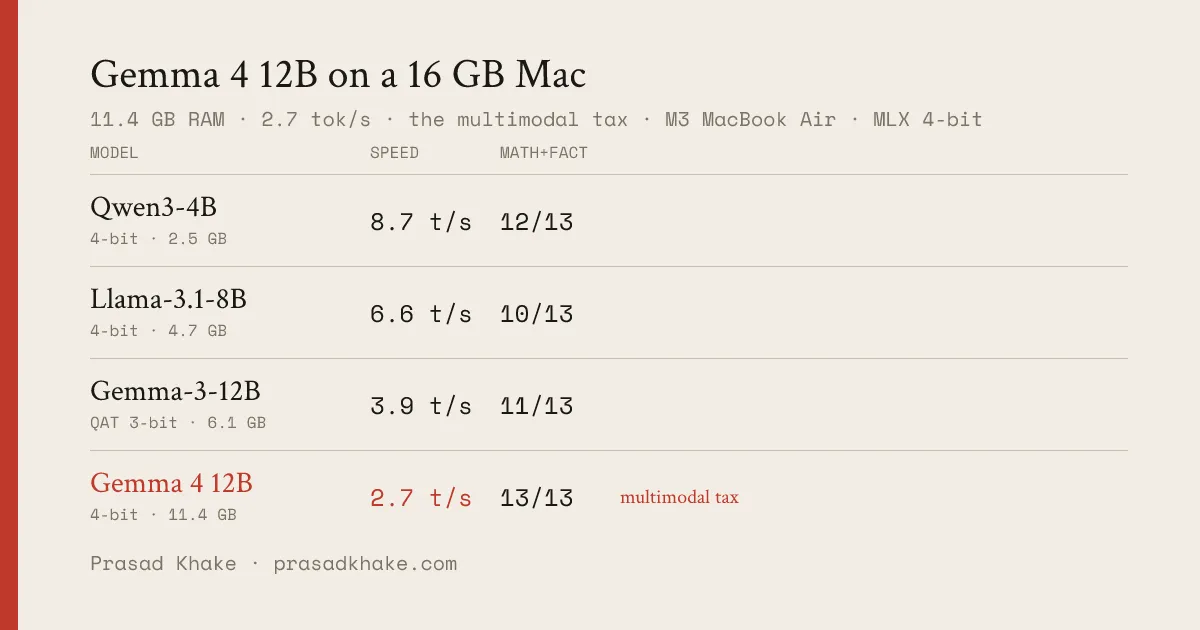
Math+factual is the cleanly-comparable axis (coding is excluded for the reasons below). Read across the rows: Gemma 4 12B edges the field on answer quality by a single question — and pays for it with 4.6× the RAM and ~3× the latency of Qwen3-4B. On a 16 GB Mac, that’s the whole story: you rent 11.4 GB and wait twice as long for, at best, a one-question quality gain you can’t even use for code.
Why mlx-lm can’t load it out of the box
Before any benchmarking was possible, loading the model failed immediately:
ValueError: Model type gemma4_unified not supported.mlx-community/gemma-4-12B-it-4bit has "model_type": "gemma4_unified" in its config — not "gemma4". mlx-lm’s MODEL_REMAPPING table maps variant model type strings to the right architecture class, but gemma4_unified wasn’t in it. The fix is one line in utils.py:
"gemma4_unified": "gemma4", # encoder-free multimodal variantAfter that, a second error surfaced at weight-load:
ValueError: Received N parameters not in model: vision_embedder.*What gemma4_unified actually is
gemma4_unified is Google’s encoder-free multimodal variant of Gemma 4. The standard multimodal Gemma 4 uses separate encoder towers (vision_tower, audio_tower) to process images and audio before handing off to the language model. The _unified variant integrates vision differently — this checkpoint carries a vision_embedder module (11 tensors) as top-level weights, alongside the audio weights mlx-lm already handled.
mlx-lm’s gemma4.sanitize() already strips the encoder-based modules during load. It skips anything starting with vision_tower, audio_tower, embed_audio, or embed_vision. But vision_embedder wasn’t in that list — so those 11 tensors surfaced as unexpected parameters.
One more line in gemma4.py:
"vision_embedder", # gemma4_unified encoder-free visionTwo lines total. The fix merged into mlx-lm as #1349 — so on a recent mlx-lm, gemma4_unified checkpoints load with no patch needed.
Why it’s slow
The speed gap is straightforward. Each generated token requires reading the model’s weights from memory once — on Apple Silicon, single-stream decoding is bound by memory bandwidth, not compute. At 4-bit:
- Llama-3.1-8B: 4.71 GB of weights to read per token → 6.6 tok/s
- Gemma 4 12B: 11.37 GB of weights to read per token → 2.7 tok/s
The ratio tracks: 11.37 / 4.71 ≈ 2.4×, and 6.6 / 2.7 ≈ 2.4×. The weight-size difference almost exactly explains the speed difference — textbook bandwidth-bound behavior.
The extra weight comes from those multimodal modules — even though we’re using the model purely for text. You pay the vision/audio architecture tax on every token, whether you need multimodal capability or not.
The verdict for 16 GB Mac users
11.4 GB leaves roughly 4.5 GB for the OS, terminal, and whatever else is open — tight on a working machine, with memory pressure showing throughout, a condition where larger models suffer disproportionately.
If you want text-only performance on a 16 GB Mac:
- Qwen3-4B (thinking off) — 2.47 GB, 8.7 tok/s, top score on this suite (20/21). 4.6× less memory than Gemma 4, ~3× faster.
- Llama-3.1-8B — 4.71 GB, 6.6 tok/s, if you want a larger dense model that still fits comfortably.
Gemma 4 12B makes sense if you need its multimodal capabilities — 256K context, vision, audio — and will trade throughput for them. For pure text generation, the footprint doesn’t pay for itself. (Within the Gemma 4 family itself, the E4B matches the 12B’s math and factual scores at 42% less RAM and 3× the speed — if you want Gemma 4 on 16 GB, that’s the build.)
The part I got wrong: a bug in my own benchmark
The original version of this post said four models scored “21/21 (100%).” Re-running the suite for a follow-up, I couldn’t reproduce those numbers — and the reason was a bug in my own answer-extraction. The math checker pulled the first number out of a response instead of the model’s final answer: a model that wrote “7! = 5040” was scored on the 7 and marked wrong. Verbose, show-your-work answers were being failed across the board. I fixed it to read the final answer, unit-tested it against the failing cases, and re-ran everything — which produced the honest table above.
Then a second, subtler problem surfaced — and it’s why Gemma 4’s coding score is N/A. Gemma 4’s default output is a long <|channel>thought reasoning trace: it explores multiple candidate solutions and describes the invocation in prose (“Call: print(fib(10))”) rather than emitting one self-contained, runnable block. My harness executes the fenced code block and checks its output — so for Gemma 4 it ran a function definition with no call, got no output, and scored 1/8. But the code is correct. This isn’t a capability gap; it’s a format mismatch between how Gemma 4 answers and what an execute-the-block benchmark assumes. Reporting “1/8” would be as wrong as the old “100%.” So: N/A, with this explanation.
The lesson generalizes: a verifiable benchmark can lie to you in model-specific ways, and the failure modes are quiet — a wrong number looks exactly like a right one until you read the actual responses. Spot-checking the failures, not the passes, is what catches it. The full three-bug chain — this one, the extractor mismatch above, and a RAM-measurement bug I almost shipped — is its own post.
Benchmarks run on a MacBook Air 15-inch (Mac15,13), Apple M3 (8-core CPU, 10-core GPU), 16 GB unified memory, macOS 26.5, via mlx-lm. One run per model, 2048-token budget, caffeinate -i during run, peak RAM via mx.get_peak_memory() reset per model. Quality suite (open source, including the fixes described above): github.com/robertlangdonn/ondevice-bench.