One flag makes Qwen3-4B beat Llama-3.1-8B on a 16 GB Mac — at half the RAM
On a 16 GB Mac, Qwen3-4B with one setting changed beats Llama-3.1-8B — at half the RAM and nearly twice the speed. The setting is enable_thinking=False. With thinking on, Qwen3-4B scores 0/8 on coding and 7/21 overall; with it off, 8/8 coding and 20/21 overall — past Llama-3.1-8B’s 18/21. Same model, same prompts, one flag. Here’s why that happens and what it costs.
The numbers
All measured on the same M3 MacBook Air, 16 GB, same 21-task verifiable suite — code is executed and its output checked, math answers compared to known results within tolerance, factual answers checked for key terms. No rubric scoring; every task has a deterministic correct answer.
| Model | Peak RAM | tok/s | Coding | Math | Factual | Total |
|---|---|---|---|---|---|---|
| Qwen3-4B (thinking off) | 2.47 GB | 12.8 | 8/8 | 8/8 | 4/5 | 20/21 (95%) |
| Qwen3-4B (thinking on) | 2.47 GB | 12.6 | 0/8 | 2/8 | 5/5 | 7/21 (33%) |
| Llama-3.1-8B | 4.71 GB | 7.0 | 8/8 | 5/8 | 5/5 | 18/21 (86%) |
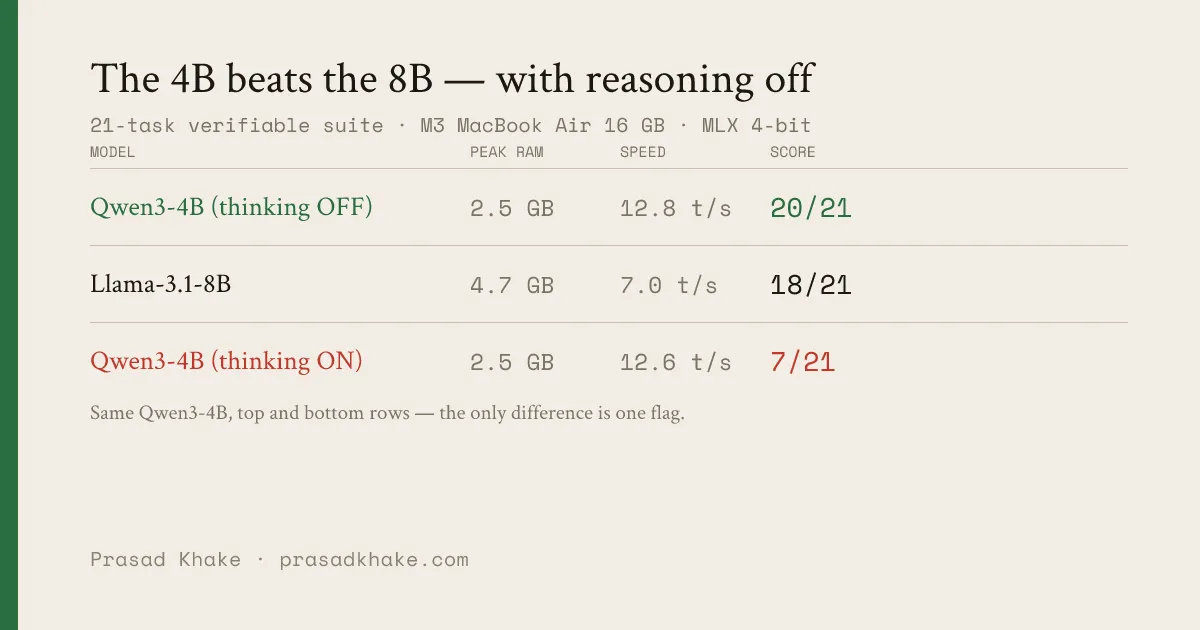
The same Qwen3-4B sits at the top and the bottom of this table — the only difference between those two rows is enable_thinking. Off, it’s the best model tested and the lightest; on, it’s the worst. The 8B in the middle is the model you’d reach for by habit, and the 4B-off beats it at half the RAM.
Note (2026-06-09). A later fix to a fizzbuzz checker bug — it was scoring output format, not correctness — raised these totals by one point each: Qwen3-4B 19→20, Llama 17→18. The ranking and the thinking-flag story are unchanged.
Two things jump out. First, the smaller model with thinking off beats the larger one — 20 vs 18 — while using half the memory (2.47 vs 4.71 GB) and running 1.8× faster (12.8 vs 7.0 tok/s). Second, the same Qwen3-4B with thinking on is the worst row in the table.
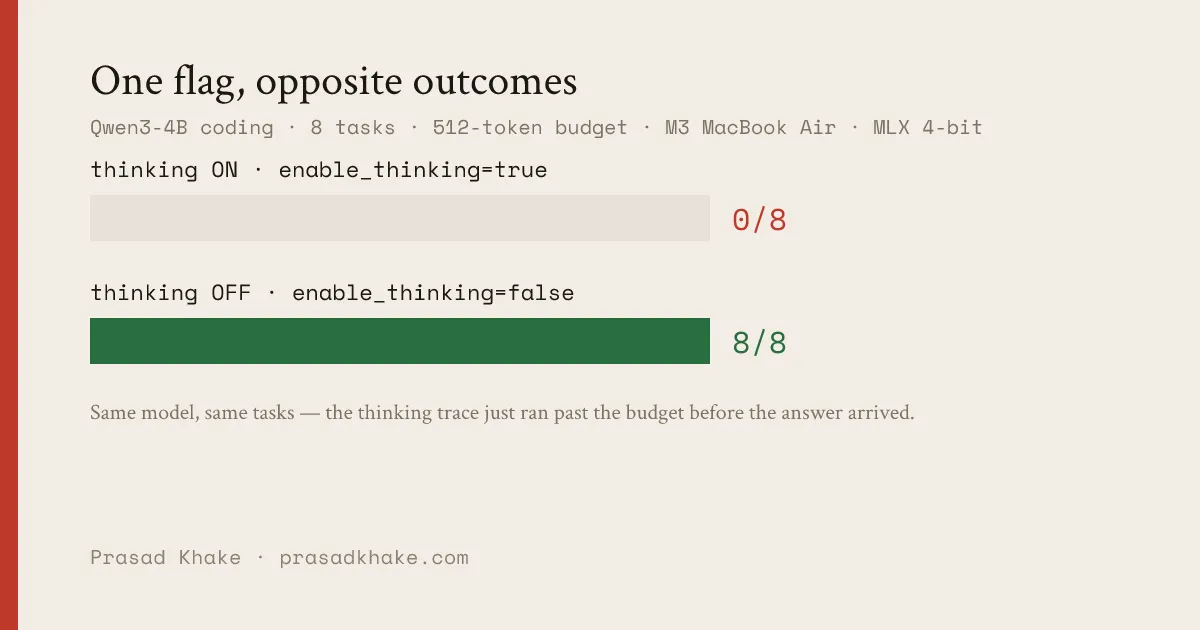
The same Qwen3-4B, the same eight coding tasks, the only change being enable_thinking=False: 0/8 with thinking on, 8/8 with it off. The thinking trace isn’t making the model smarter here — it’s running past the 512-token budget before the model ever emits a solution. Turning it off doesn’t change what the model knows; it changes whether the answer fits in the budget.
What the flag actually does
enable_thinking=False is not a sampling or decoding change. It changes the prompt. With thinking enabled, Qwen3’s chat template ends like this:
<|im_start|>assistant…and the model is free to open a <think> block and reason at length before answering. With enable_thinking=False, the template instead ends:
<|im_start|>assistant
<think>

</think>
The reasoning block is pre-filled as already closed. The model sees an empty, completed <think></think> and goes straight to the answer. That single structural change is the entire mechanism — confirmed by diffing the rendered chat template:
on  = tok.apply_chat_template(msgs, add_generation_prompt=True)
off = tok.apply_chat_template(msgs, add_generation_prompt=True, enable_thinking=False)
# off ends with: ...<|im_start|>assistant\n<think>\n\n</think>\n\n
Why thinking hurts here
The suite caps generation at 512 tokens — a realistic budget for an interactive on-device assistant. With thinking on, Qwen3-4B spends that budget reasoning. On the coding tasks it scored 0/8: not because the solutions were wrong, but because the response hit 512 tokens mid-thought and never reached runnable code. The math tasks tell the same story — 2/8, mostly truncated derivations.
Turn thinking off and the model answers directly: 8/8 coding, 8/8 math. The knowledge was always there. The thinking trace was just spending the budget before the answer arrived.
This is the benchmark trap with reasoning models: evaluate them with a tight, interactive token budget and a long thinking trace is a liability, not an asset. It’s also the deployment trap — on a 16 GB Mac you keep the budget tight, so the trace works against you in exactly the setting where these models run.
What it costs
Thinking off is not free everywhere. The one place Qwen3-4B-off slipped that thinking-on held was the factual set (4/5 vs 5/5) — disabling deliberation cost it one recall task (it answered “Apple Silicon” instead of “M1” — the same question Apple’s own on-device model flubbed, the same way). On harder, multi-step problems with a generous token budget, the thinking trace is exactly what you’d want. But for the workloads a 16 GB Mac runs interactively — short coding tasks, arithmetic, factual lookups, all under a tight latency and token budget — off is the right default.
On the honesty of these numbers
An earlier version of my benchmark scored these models higher, because the answer-extraction step had a bug: it read the first number in a response, not the model’s final answer. A model that wrote “7! = 5040” was scored on the 7 and marked wrong. I found this re-running the suite for this post, fixed it to read the final answer, unit-tested it against the failing cases, and re-ran everything from scratch. The table above is the post-fix result. Llama’s 5/8 math, for instance, is real — it computed 17.5% of 240 as 58, and 1+2+…+100 as 5150. A benchmark that executes and checks should catch its own author’s bugs too. The full chain — this bug plus the two more it exposed — is its own post.
The practical upshot
If you’re choosing a model for a 16 GB Mac and you reach for Llama-3.1-8B out of habit, try Qwen3-4B with enable_thinking=False first. It scored higher on this suite (20 vs 18), used 2.2 GB less RAM (2.47 vs 4.71 GB), and ran nearly twice as fast — and it leaves that memory free for everything else you’re running. The smaller reasoning model, with its reasoning turned off, is the better interactive default.
# mlx-lm — disable the thinking trace for Qwen3
python -m mlx_lm.generate \
  --model mlx-community/Qwen3-4B-4bit \
  --prompt "<your prompt>" \
  --chat-template-config '{"enable_thinking": false}'
I work on making LLMs run well on-device. The benchmark used here is ondevice-bench, open source — the 21-task suite executes code and checks answers, no rubric scoring.